→ Back to projects overview

elastiMass v1.9: cross-project data search software

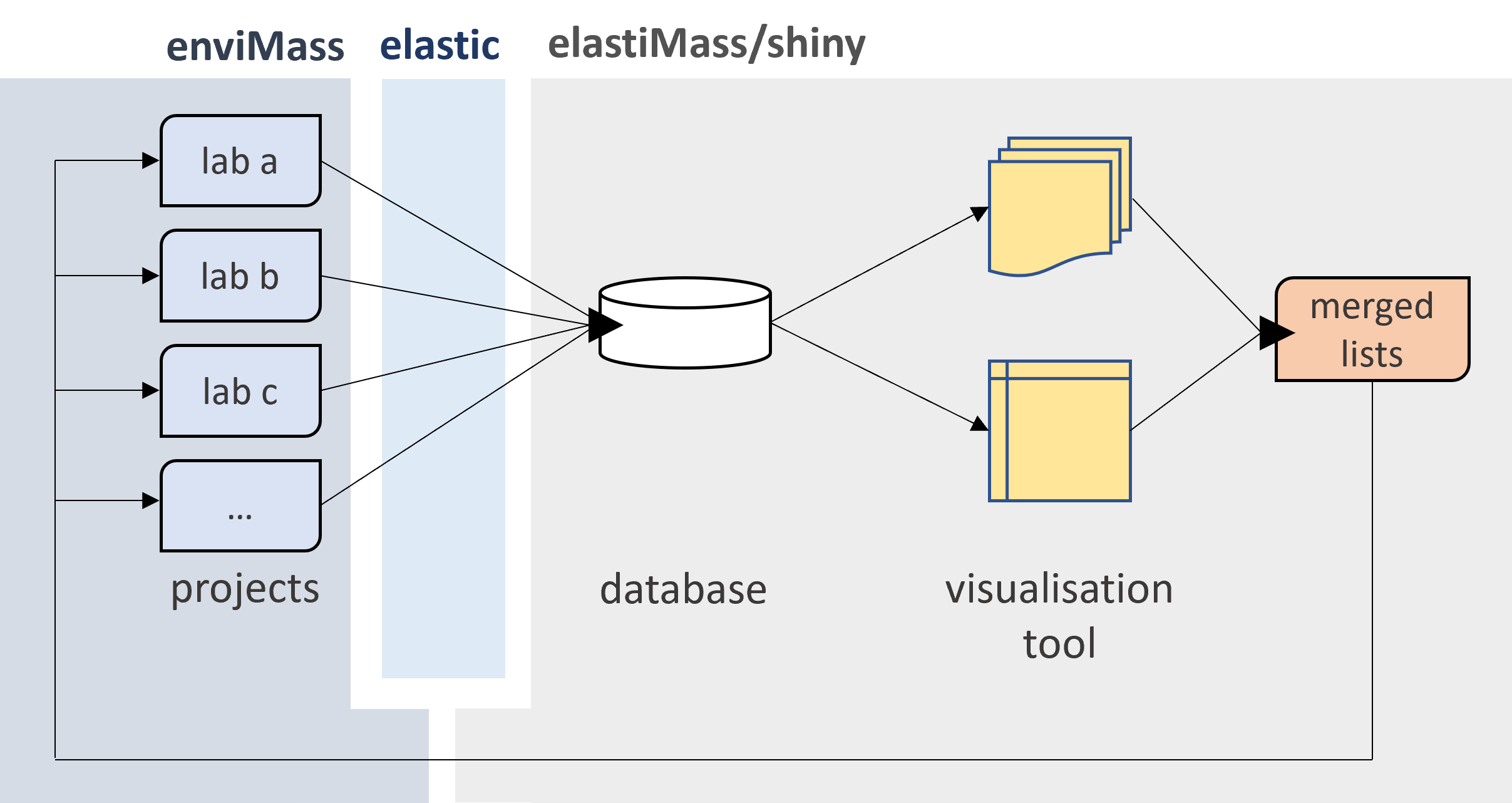
elastiMass aligns and synchronizes larger sets of enviMass projects (e.g., from a multi-user setting on a common server) into a single Elasticsearch database, in realtime, as a background process, and fully autonomously. From this common database, peaks, profiles and any annotated target and nontarget screening information can be queried and compared cross-project with an additional visualization interface. Within this process, each enviMass project may contain data from different sampling locations at different temporal resolutions, but from a single MS instrument.

In addition, the elastiMass interface can be used to merge and re-distribute new target und watchlist entries made in a single project into all other stored projects. It also notifies users of any required project management tasks.

Main functionalities

webMass elastiMass provides four main services:
  1. A routine which monitors the state of a set of enviMass mass spec data projects. If these have been recalculated or changed otherwise, they are being locked and their peak chromatograms, profiles, metadata and all other relevant information synchronized into the common database. Only changed data is being re-synchronized to keep the synchronization time at a minimum. In locked mode, users cannot make modifications, but can still view the calculated results of their projects. Having finished on a project, the routine again unlocks a project for further modifications.

  2. Having completed all necessary synchronization tasks, elastiMass aligns the retention times (RT) among all projects to a single benchmark RT. It also estimates the RT uncertainties with which mass spec data from one project can be searched in any of the other projects.

  3. The aligned and synchronized data can be queried and viewed with a visualization tool, based on a shiny user interface (UI). The full content in this tool gets automatically updated as soon as a new snychronization cycle has been completed. During synchronization, as much data as freshly synchronized is made available for queries and visualization.

  4. The visualization tool allows users to interactively merge modifications in their target compound lists and nontarget observation lists. It checks for new entries (e.g., when moving a nontarget entry after identification onto the target list, etc.), and any modifications (e.g., increases in the confidence level of a target compound, or the assignment of new compound classes, etc.), and manages the removal of entries, and highlights conflicts (e.g., when several users accidentally add the same entries). A notification board gives an overview of any tasks an owner of a project should focus on to keep a project in tune and healty (e.g., removal of expired entries in a nontarget observation list).
As a fully documented R package, elastiMass is organised into a comprehensive set of R functions, which allow administrators to run these services. Any other non-admin users might then simply only focus on using the visualization tool, and the enviMass UI for their individual projects.
UI features

Project states
A first tab in the visualization tool lists all available synchronized projects, including per-project information on:
  • the synchronization state,
  • the date of the last synchronization,
  • the project re-calculation counts,
  • its enviMass version,
  • the project path and keys.
Alignment
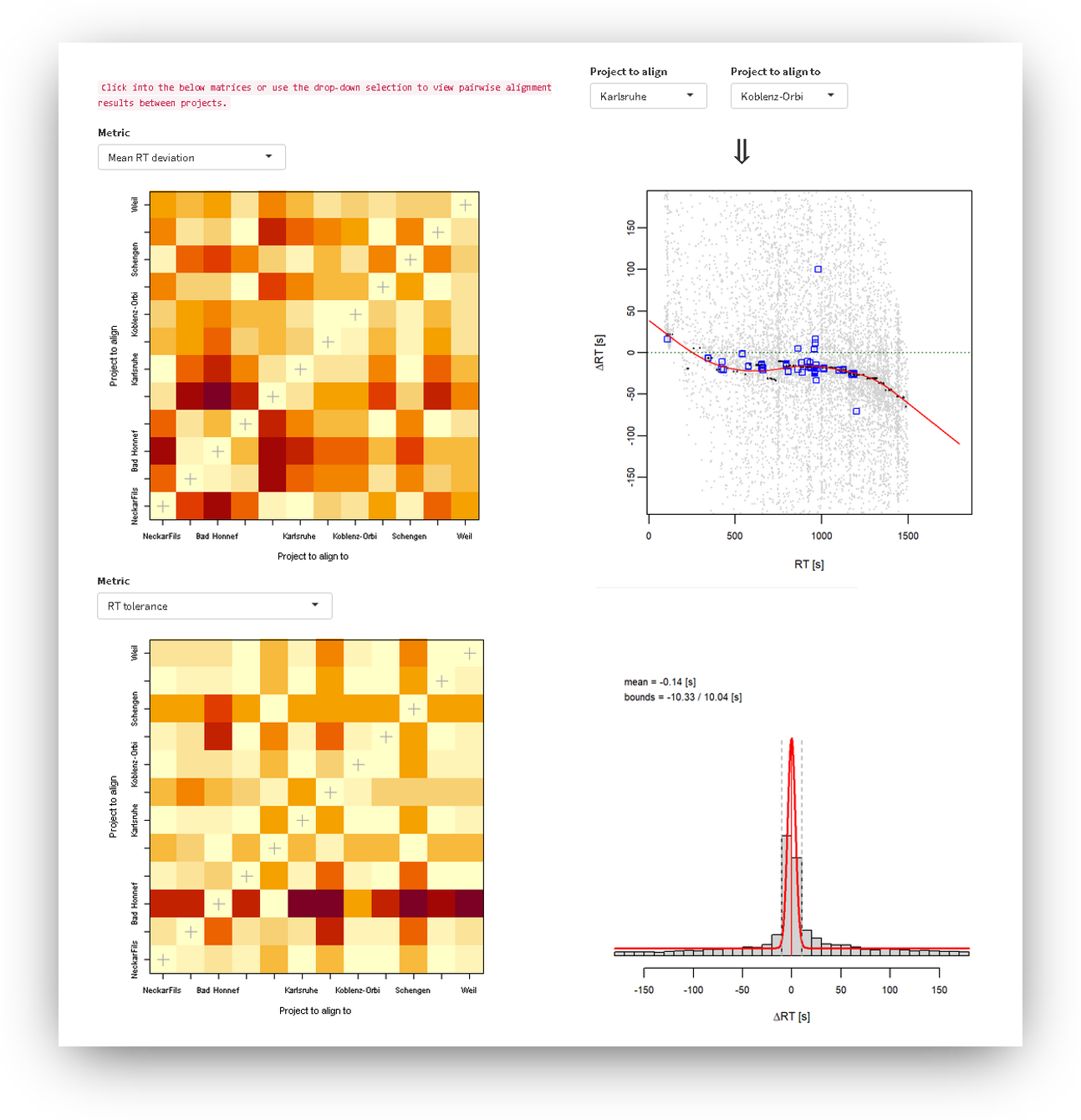
A dedicated tab views the retention time (RT) alignment outcomes over all projects and for different metrics, as well as the remaining RT uncertainties after alignment, and based on a mixed statistical distribution model. Projects can be compared pairwise for these properties, while a comparison matrix quickly highlights major differences even in larger sets of synchronized projects.

Tables
Another tab tabulates the following for each project:
  • the target and suspect compound lists,
  • the ISTD compound list,
  • a list with all available measurements,
  • an observation list with information on any nontargets of concern.
screenshot_align
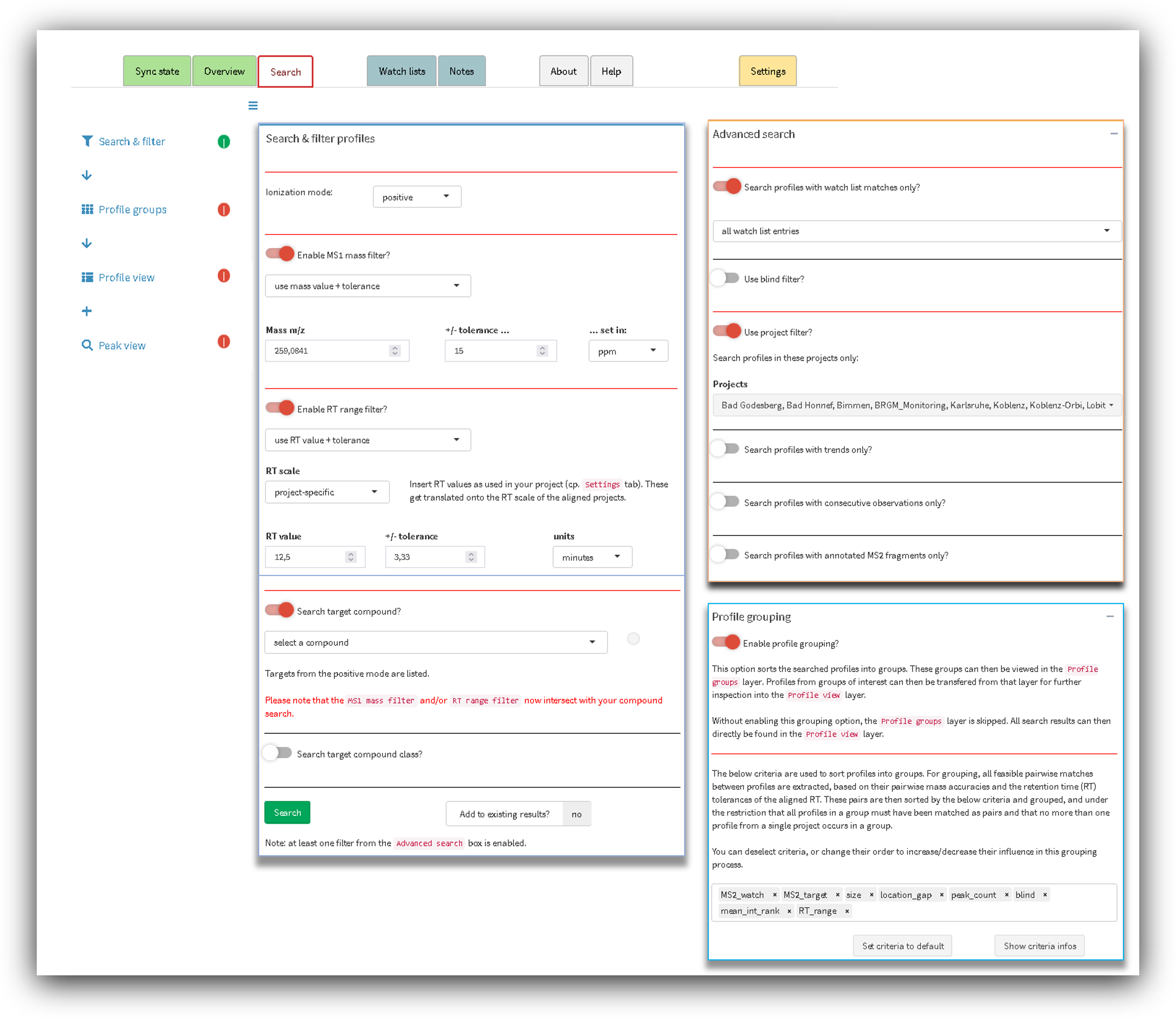
Basic search
A set of basic queries can be applied on the synchronized profiles, with the following options:
  • ionization mode,
  • mass (m/z) or mass ranges (auto-adapt),
  • RT or RT ranges (auto-adapt),
  • target compound matches (selectable from a dropdown menu),
  • target compound classes (selectable from a dropdown menu).
These query options can be freely combined, and also added to previous search resuls. Notifications are shown in case the query settings are conflicting.

Advanced search
A set of advanced query options can be added to the basic search settings, or used stand-alone:
  • search profiles with watch list matches only,
  • blind filter (2 options),
  • project filter (to exclude certain projects),
  • profiles with current time-intensity trends,
  • profiles with time-consecutive peak observations,
  • industrial profiles (if such scripts are embedded),
  • profiles with annotated MS2 fragments (selectable for target and/or observation list matches).
RT
Profile grouping
Another functionalitly in the visualization tool pre-groups the profiled mass spec data from the basic and/or advanced search results, using different selectable criteria with adjustable prioritization for this purpose. Thus, profiles with comparable mass and retention time are shown as a group instead of singular results. Again, this grouping is optional. If disabled, the grouping outcomes are not shown as a seperate top layer in the search results.
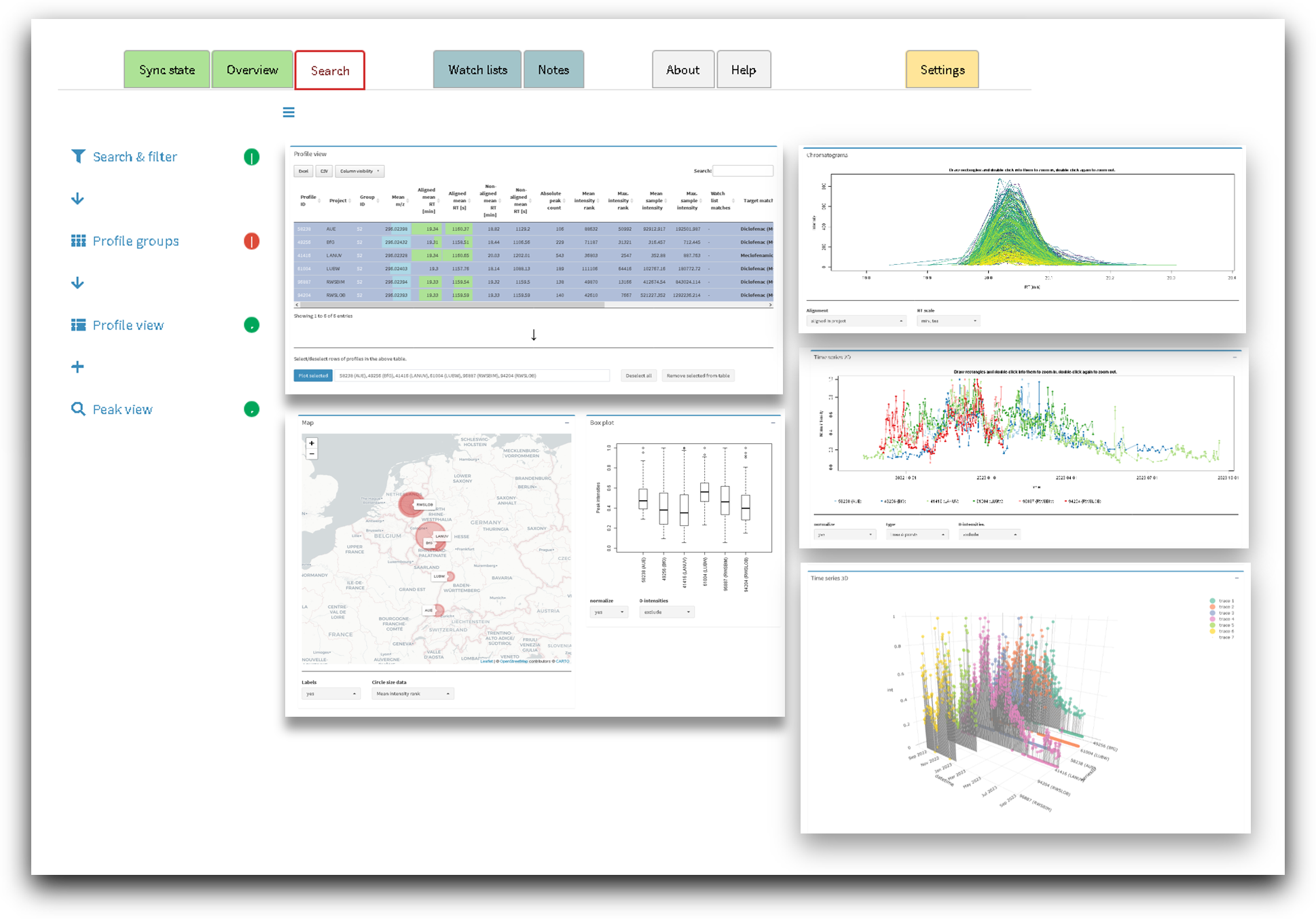
Profile view
A first layer presents the search results, and allows to select subsets of profiles for further inspection. This view layer includes:
  • a selectable profile table with more than 20 relevant profile characteristics,
  • a highly customizable 2-D profile plot,
  • a 3-D profile plot,
  • a spatial distribution map for different profile characteristics,
  • boxplots with normalized peak intensities for the selected profiles.
Peak view
A second search result layer allows to inspect the peak characteristics of single profiles from the first result layer in more detail. This includes:
  • peak chromatograms over the full profiles (RT-aligned and unaligned),
  • an exportable peak table with different peak characteristics.
screenshot_align
Data merging
An interactive merging tab allows project owners to merge their target and observation lists with those of other projects. RT values and - in the case of targets - updates in the confidence levels and assigned compound classes are thereby distributed across all projects and project owners in the most automated and safest way possible. The merged lists are directly transferred to the relevant enviMass projects, from where they can be pulled by the click of a single button. This import checks which influence these modified or new targets might have on a project, so that subsequent calculations in an enviMass project are kept to a minimum.
Notifications
A notifications dashboard hints individual project owners at tasks that should be completed for their project, and following each newly completed synchronization cycle. This notifies the user for the availability of new target compounds and observation list entries, for the expiration of entries that stem from this project, for potential conflicts, and other important tasks.
Scripts
If required, additional R-based scripts can be embedded in the synchronization routine. This allows for a flexible inclusion of additional data, e.g., for time-resolved and updated discharge characteristic with which profile intensities can be corrected.

Availability

The distribution of elastiMass is administered by the International Commission for the Protection of the River Rhine (IKSR/SANA), and as part of the project Non-target screening in the Rhine basin.

In addition, and for the management of the underlying mass spec data projects, elastiMass is built on enviMass. The latter is freely available for all contributors, and as part of a Software- & Support-Package otherwise. The database used for synchronization of enviMass projects is based on freely available versions of the open source Elasticsearch database engine.

Contact
→ Back to projects overview